Radar in action: a clear-weather training scenario
A structured, hypothetical radar practice session for a newly installed system, connecting product choice with observation, settings and useful records.
Illustrative planning scenario, not an actual voyage or sea trial. Product details use manufacturer documentation. Sources checked 3 October 2026.
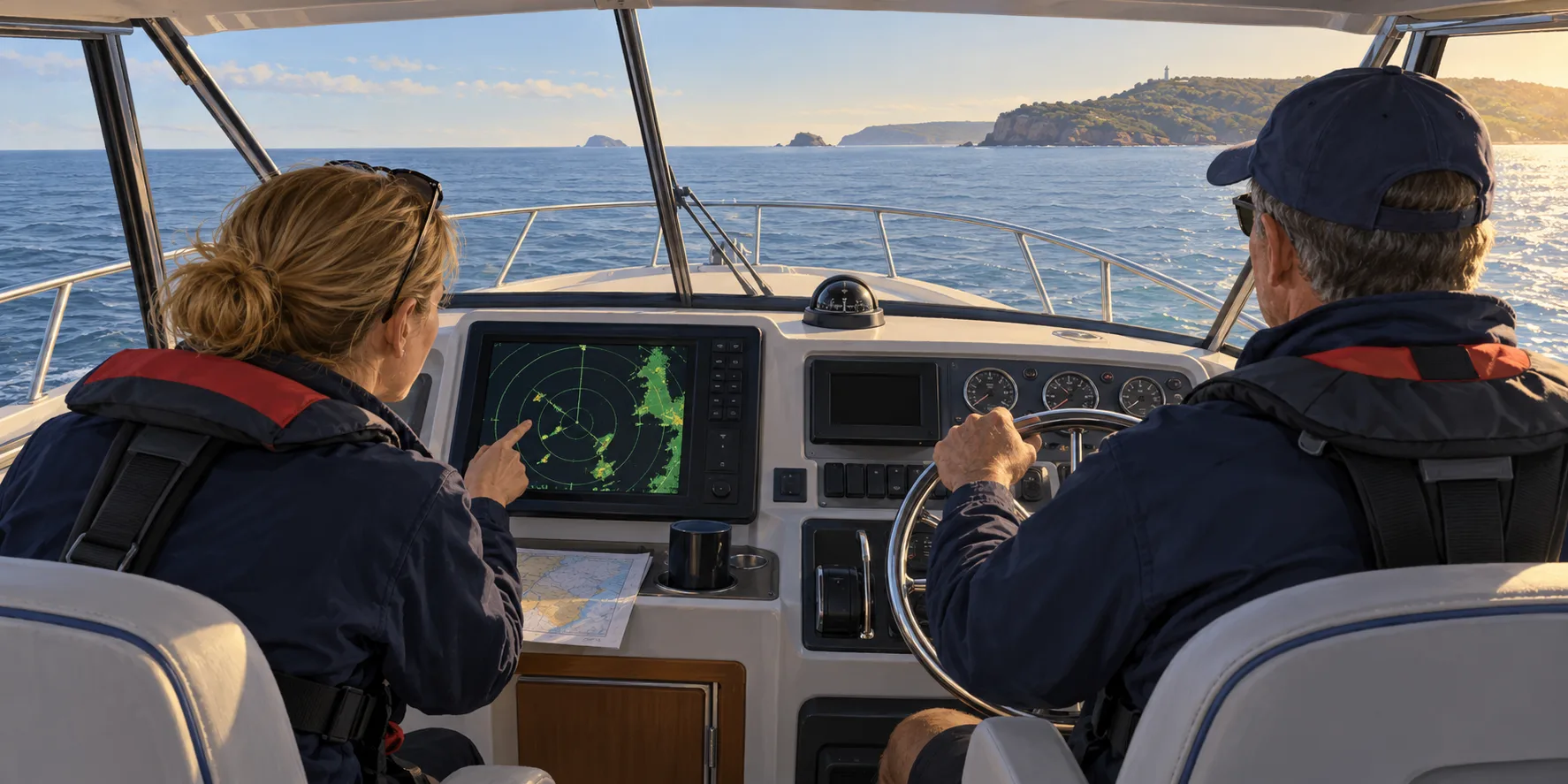
The scenario: a hypothetical coastal cruiser has a newly installed compact radar. The installation has been professionally checked, and the crew want to understand the display before relying on it in harder conditions. This is a proposed learning exercise, not a report of testing HALO, Quantum or Fantom equipment.
Arrange suitable clear conditions, enough sea room and competent supervision. Keep a person responsible for safe navigation and lookout throughout. If that cannot be maintained while another person explores the controls, postpone the exercise or work through a demonstration alongside instead.
#Stage 1: establish what the screen is showing
Choose visually identifiable fixed features in a suitable practice area and compare their relative positions with the radar picture. Confirm the display's orientation and distinguish the radar view from a chart overlay. Use the installer and the specific manual to resolve unexplained alignment or heading issues.
| Observation to record | Useful question |
|---|---|
| Recognisable shoreline or structure | Does its position make sense in this orientation? |
| Apparent blank sector | Could the scanner's view be obstructed? |
| Chart overlay looks displaced | Are heading, position and alignment correct? |
| Unexpected return | Can it be explained by another observation or setting? |
Do not tune the picture merely to make it look neat. A clean screen is not proof that all relevant objects have been detected.
#Stage 2: learn one control at a time
Use the manufacturer's instructions to explore range, gain and clutter controls while a competent person supervises the navigation. Make one deliberate change, observe the effect and restore the understood setting before exploring another. The purpose is to learn what information is gained or lost, not to memorise a universal setting for every sea state.
The radar tuning guide supplies the broader explanation. Product examples are documented in Raymarine's Quantum resources and Garmin's installation guidance; their specifications do not establish that the same settings or imagery behaviour apply across brands.
#Stage 3: understand time without prescribing a manoeuvre
As a simplified arithmetic example, a relative closing speed of 12 knots changes separation by 0.2 nautical miles in one minute. That explains why time spent interpreting a screen matters. It does not predict the closest point of approach, establish collision risk by itself or tell the helmsman which way to turn.
For a moving target, observe how reports develop over time and compare with other available information. Treat Doppler colouring and computed tracks as aids requiring interpretation. Do not assume every target carries AIS, that an AIS symbol and echo always match, or that a single instantaneous picture answers the encounter.
#Stage 4: finish with a useful record
Record the display and scanner models, software, known obstructions, settings explored and questions to take back to the installer or instructor. Note what the crew could identify and where they remained uncertain. A training record should describe observations, not award a product a detection score from one informal outing.
The next purchase decision may be training, a mounting correction or better heading data rather than a larger scanner. Use the compact-radar shortlist only when hardware selection is still the unresolved issue. The goal of this scenario is a crew who understand their equipment better, while continuing to navigate with all the information and responsibilities that apply.
Continue building the system
These guides pick up where this one stops.
Seamanship & Safety
How to tune marine radar
Radar is a fog instrument that must be learned in clear weather. This is the order to set it up in, and the targets to practise identifying.
Read the guideRanked shortlist
Top 3 compact marine radars for a cruising-yacht refit
A ranked compact-radar shortlist for a cruising yacht, with explicit selection criteria, ecosystem exceptions and links to detailed model comparisons.
Best for A new power-conscious cruising-yacht helmCheck first Order changes with retained equipment; no comparative sea trial or installed-price test.Also needed Complete regional package and a comparable installation quote Read the guideBuying Guides
Marine radar compatibility: check the display before buying
Check radar model, display, software and network requirements before buying. Worked examples cover Garmin Fantom, Furuno NXT and Raymarine Quantum.
Best for Checking a scanner before purchaseCheck first A network socket alone does not establish scanner compatibilityAlso needed Display model, software, imagery path, power and heading plan Read the guideSeamanship & Safety
Night and poor-visibility navigation
After dark the boat has not changed, but almost everything about how you navigate it has. Screen brightness, watch discipline and radar habits decide how safe the night is.
Read the guide AI illustration
Worked example
Worked example: electronics for a 6 m coastal fishing boat
Build a hypothetical trailer-boat shopping list, compare Eagle and Elite FS, and separate chart coverage, sonar installation and future expansion.
Best for A 6 m coastal fishing-boat planCheck first Future live sonar requires its own hardware and budgetAlso needed Exact display, transducer, Australian charts and installation Read the guide AI illustration
Worked example
Worked example: replacing depth instruments on a 10 m sailing yacht
Follow a hypothetical depth-instrument refit from diagnosis to equipment choice, depth-reference arithmetic and a recorded acceptance check.
Best for A 10 m sailing-yacht depth refitCheck first Unidentified sensors prevent a compatibility decisionAlso needed Diagnose first, then quote the supported complete installation Read the guideReferenced by
Other guides that depend on the ideas on this page.
- Marine radar: Doppler, solid-state and open array9 min
- Raymarine Quantum 2 Q24D: product and installation guide4 min
- Simrad HALO20+ vs Raymarine Quantum 2: a compact radar comparison3 min
- Raymarine Quantum 2 vs Garmin Fantom 18x: which system fits?3 min
- Top 3 compact marine radars for a cruising-yacht refit2 min
This guide is independent editorial information, not a substitute for official regulation. Equipment requirements, licensing and chart currency differ by jurisdiction and change over time — confirm the current position with the AMSA, the Australian Hydrographic Office, ACMA and your state or territory maritime authority before relying on it.